Copied 2FA Code to Clipboard!

2FA in your browser. Not on your phone.

Stop pulling out your phone every 10 minutes. KeySync securely encrypts and auto-refreshes your 2FA tokens directly inside your Chrome toolbar with instant 1-click clipboard copy.

No Account Required 1-Click Google Authenticator Import Zero Telemetry or Tracking
chrome-extension://keysync/popup.html
KeySync KeySync Pinned
Real Production UI

Your entire 2FA vault,
one click away.

Clean, flat, ultra-fast design. KeySync automatically categorizes your services, pulls official brand logos, and ticks in real-time with zero system lag.

Instant 1-Click Copy: Click any code to copy directly to clipboard.
Automatic Brand Icons: GitHub, Stripe, Binance, AWS, and cached favicons.
Real-Time Search: Instant filtering as you type.
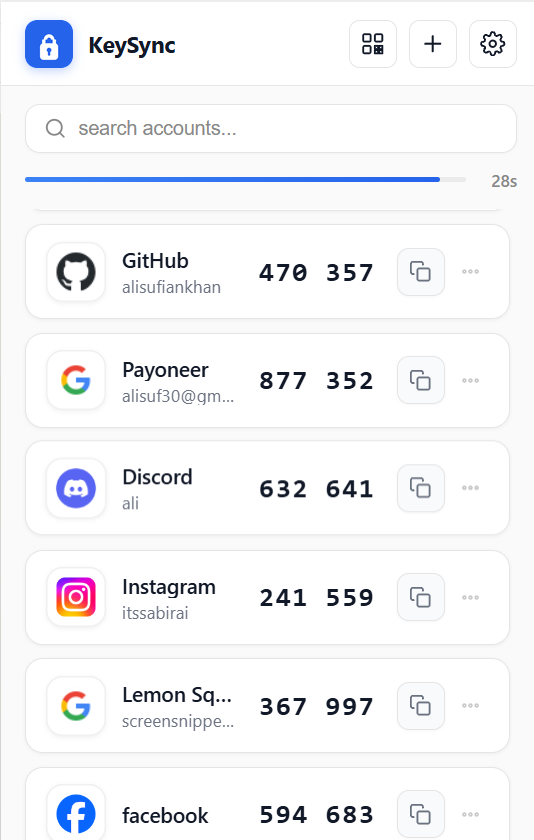
KeySync Real Extension View with TOTP codes

Why another 2FA app? Because phone authenticators break your focus.

Authenticators were designed for mobile phones in 2011. In 2026, engineers, designers, and founders log into AWS, GitHub, Stripe, and Discord from their desktop computers all day long.

Phone Apps: ~35-45s & 4 context breaks
KeySync: 1.2s in 1 toolbar click
The Traditional Friction

The 10-Minute Phone Dance

Constant interruptions, timer anxiety, and single-point-of-failure risk.

1 Pick up phone & unlock (FaceID fails)
2 Search & scroll through dozens of apps
3 Memorize 6 digits & rush to browser
Code expired at 29s... repeat again!
Focus & Flow State Destroyer

Pulling your phone out 20–30 times a day shatters developer momentum and creates needless friction.

30-Second Countdown Panic

Frantically transcribing digits while glancing back and forth between your phone screen and laptop.

Cloud Lock-In & Sync Leaks

Major cloud authenticators sync plaintext secrets to remote servers or commercial telemetry networks.

The Lost Phone Catastrophe

A broken phone screen or stolen device permanently locks you out of your critical production accounts.

10x Faster Workflow
Native Browser Superpower

1.2 Seconds. Right Where You Work.

Local-only, client-side encrypted, keyboard-first 2FA toolbar.

KeySync KeySync Quick Bar
Alt + Shift + K
Stripe Payments
837 304 Click to Copy
Hands Never Leave Keyboard

Press your configurable shortcut or click the pinned toolbar badge. Codes appear instantly.

1-Click Clipboard Injection

Click any account row to automatically inject the fresh 6-digit TOTP code into your clipboard with instant toast feedback.

True Air-Gapped Encryption

Encrypted with AES-256-GCM and PBKDF2 (100,000 rounds). Keys live in volatile RAM only during your active session.

100% Vault Sovereignty

One-click unencrypted JSON backup export & restore whenever you want. You are never trapped or dependent on a vendor.

Engineered for speed, privacy, and simplicity.

Explore the exact interface you'll be using. Real production captures with zero mock filters.

Core Workflow

Copy your 2FA code in one painless click.

KeySync shows all your active accounts with live 30-second epoch synchronized timers. Search instantly across dozens of accounts and click any card to copy.

  • Instant Clipboard: Tap a code, paste into your browser. Done in 1.2s.
  • Smart Domain Favicons: Automatically detects brand logos or caches high-res domain favicons.
  • Precise Epoch Sync: Never misses an epoch boundary or gets out of sync with servers.
KeySync Main TOTP Screen
Effortless Migration

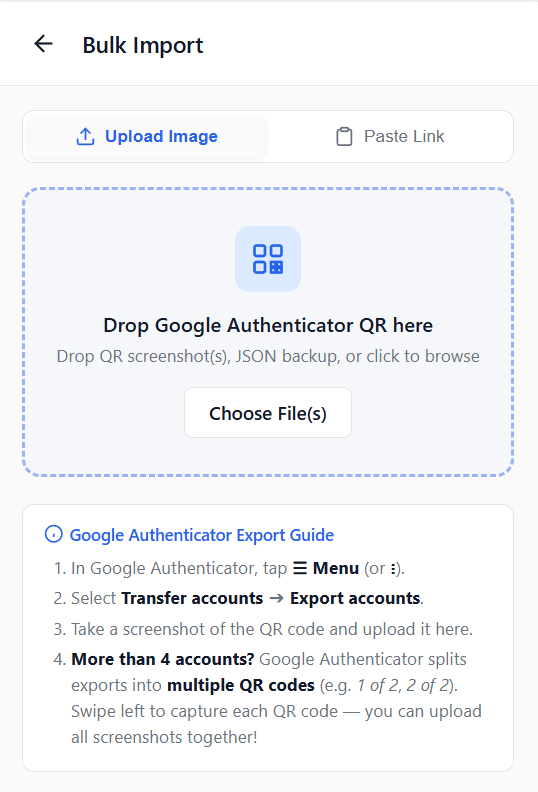
Migrate from Google Authenticator in 10 seconds.

Moving your accounts shouldn't take an afternoon of manual typing. Export your accounts in Google Authenticator, take a screenshot, and drop it here.

  • Drag & Drop QR: Accepts screenshot images or raw Google migration URLs.
  • Multi-Part Batch Exports: Handles split QR codes (e.g. 1 of 2, 2 of 2) seamlessly.
  • Interactive Selection: Review each account before importing to your vault.
Google Authenticator QR Bulk Import Screen
Security & Freedom

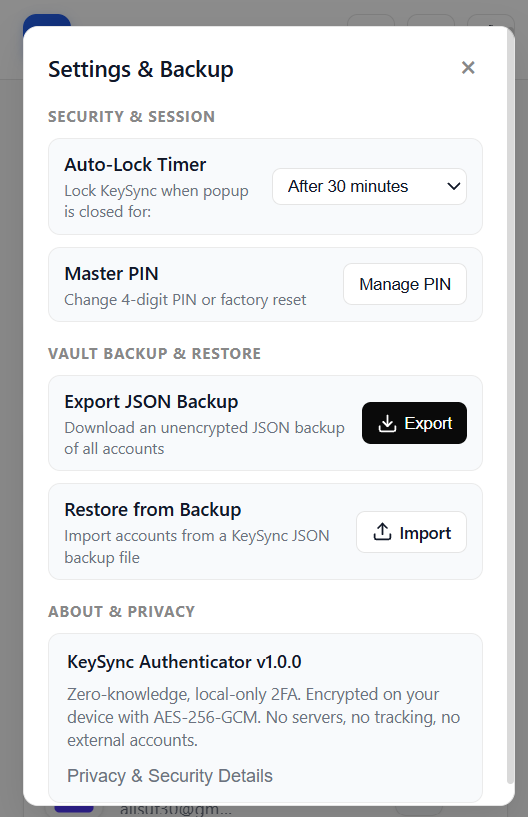
Session Auto-Lock & Zero Lock-in Backups.

Configure your auto-lock timer to lock KeySync when idle (Immediately, 5m, 15m, 30m, or on browser close). Export your raw JSON backup whenever you choose.

  • In-Memory Key Storage: Session keys live in volatile RAM (chrome.storage.session), never on disk.
  • Master PIN Security: Rate limiting protects against local brute-force attempts.
  • 1-Click JSON Vault Export: Restore to any machine or archive safely offline.
KeySync Settings & Backup Screen
Precision Input

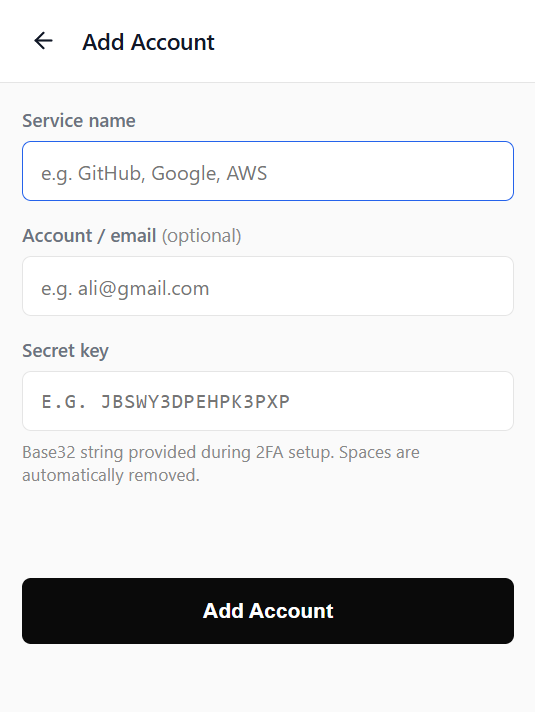
Add any custom service with smart auto-formatting.

Pasting a raw Base32 secret? KeySync automatically removes accidental spaces, validates key length, and maps to official brand icons instantly.

  • Space & Case Stripping: Never fails on messy clipboard pastes.
  • Custom Email & Issuer: Keep multi-organization logins neatly organized.
  • Standard RFC 6238 TOTP: 100% compatible with every service in the world.
KeySync Add Account Screen

No black boxes. Here is exactly how your keys are protected.

KeySync doesn't have a backend. We don't have user databases, API endpoints, or analytics dashboards. Your secret keys are encrypted client-side by your CPU.

AES-256-GCM

Industry standard authenticated symmetric encryption. Each time your vault is written to disk, a fresh cryptographically random 12-byte initialization vector (IV) is generated.

PBKDF2 Key Derivation

Your 4-digit PIN is stretched into an encryption key using 100,000 iterations of PBKDF2 with SHA-256 and a 16-byte random salt, making brute-force attacks computationally infeasible.

Zero Cloud Leaks

KeySync has 0 remote analytics, 0 tracking cookies, and 0 external servers. The only outbound HTTP calls are public Google Favicon lookups for custom domain icons.

How KeySync compares to alternatives

Honest, side-by-side feature comparison between popular 2FA authenticators.

Core Capabilities
KeySync
KeySync
Local-First
Google Auth
Mobile Only
Twilio Authy
Desktop Deprecated
Cloud Vaults
1Password, Bitwarden
Direct Browser Toolbar Access
Hotkeys & instant popup without reaching for your phone
1-Click Toolbar
Phone only
Desktop deprecated
Via Extension
100% Local-Only Storage
Hardware AES-256-GCM encryption on your device only
Device AES-256
Google Cloud Sync
Twilio Cloud Sync
Remote database
1-Click Google Auth QR Migration
Bulk import accounts from Google Authenticator QR screenshot
Batch QR drop
Not applicable
Manual entry
Manual entry
No Account / Login Required
Zero emails, phone numbers, or account registrations needed
100% Anonymous
Google Account required
SMS phone required
Master login & email
Free & Open Source Core
Auditable client-side code with MIT licensing and zero paywalls
Free (MIT Open Source)
Free (Proprietary) Free (Proprietary)
$36 - $60 / year
Unencrypted JSON Backup Export
Full data sovereignty to export or migrate your raw TOTP secrets
Full Data Freedom
QR screen only
Locked in
Varies by provider
Browser Toolbar Access Hotkeys & instant popup without reaching for your phone
KeySync KeySync
1-Click Toolbar
Google Auth
Phone only (breaks focus)
Storage & Encryption Hardware-backed AES-256-GCM encryption on device
KeySync KeySync
100% Local AES-256
Google Auth
Synced to Google Cloud
Google Auth QR Import Bulk import accounts from Google Authenticator QR screenshot
KeySync KeySync
Instant 1-Click QR Drop
Google Auth
Native (export only)
Account & Registration Zero emails, phone numbers, or commercial telemetry
KeySync KeySync
100% Anonymous
Google Auth
Google Account required
Pricing & Open Source Auditable client-side code with MIT licensing
KeySync KeySync
Free (MIT Open Source)
Google Auth
Free (Closed Source)
Vault Backup Export Full data sovereignty to backup or restore offline
KeySync KeySync
Unencrypted JSON Export
Google Auth
QR screenshot only
Ali Sufian

Built by Ali Sufian

Software Engineer

Building fast, local-first developer tools with zero telemetry.

Everything you need to know

Yes. KeySync is 100% free with no subscriptions, in-app purchases, or telemetry tracking. All encryption and TOTP calculations happen directly on your CPU inside the browser. No servers, no accounts.
Your secrets are encrypted using AES-256-GCM and saved locally in Chrome's sandboxed extension storage (chrome.storage.local). Unencrypted secrets are never saved to disk. When unlocked, temporary session keys live exclusively in volatile RAM (chrome.storage.session) and are erased upon auto-lock or browser exit.
No. Chrome extensions run inside strictly isolated sandboxes. Websites you visit have zero access to KeySync's memory, storage, or interface. Only you can view or copy codes when opening the extension popup.
Because KeySync uses true zero-knowledge encryption, your PIN is the literal cryptographic key that decrypts your vault. If lost, your vault cannot be decrypted by anyone. We strongly recommend using the Export JSON Backup feature in Settings to store an encrypted or offline copy in a secure location.
In Google Authenticator, tap the menu > Transfer accounts > Export accounts. Take a screenshot of the QR code, open KeySync's Bulk Import screen, and drop the screenshot image. KeySync automatically reads the migration payload and imports all accounts at once.

Ready to ditch the phone dance?

Install KeySync in 10 seconds. Import your codes, configure your PIN, and never pull your phone out for a 2FA code again.